B
BRAINBAY

Project Controls · Intelligence · AI

Categories
Project Controls

AMAALA Triple Bay 2026 Update: From Construction Megaproject to Live Destination

AMAALA Triple Bay 2026 has reached the point every major development ultimately works toward: guests are arriving while the wider destination continues to be delivered around them. That makes this year especially important for planners, engineers and project-controls professionals. The story is no longer only about construction progress. It is now about phased handover, commissioning, operator readiness, interfaces and the difficult transition from project delivery into live operations.

Red Sea Global officially welcomed the first guests to Four Seasons Resort and Residences AMAALA at Triple Bay on 15 June 2026. Six Senses AMAALA followed in July, and on 18 August, Rosewood AMAALA became the third resort to open at Triple Bay.

Those milestones provide a more useful picture of current status than an old percentage-complete figure. AMAALA is now a live destination, but its phased delivery is still continuing.

AMAALA 2026 milestone timeline

15 June 2026
Four Seasons AMAALA opens and the destination begins live operations.
July 2026
Six Senses AMAALA opens, expanding the wellness offering.
18 August 2026
Rosewood AMAALA becomes the third operating resort at Triple Bay.

AMAALA Triple Bay 2026: where the destination stands

AMAALA is being developed by Red Sea Global on Saudi Arabia’s northwestern Red Sea coast. The developer’s current official AMAALA overview lists a total area of about 4,200 square kilometres, nine hotels with around 1,600 keys, more than 300 branded residences, 100% renewable power and a target of 30% net conservation gain by 2040.

These figures matter because AMAALA should not be treated as a single hotel project. It is a destination programme made up of hospitality assets, branded residences, wellness facilities, marine infrastructure, utilities, roads, landscaping, staff accommodation, retail, dining and destination-wide operational systems.

That scale changes the meaning of completion. One building may already be earning revenue while an adjacent package is still being commissioned. A marina may be operational while another resort is finishing interiors. Public areas may be handed over in sections while construction logistics continue through controlled routes elsewhere.

Red Sea coastline illustrating the natural setting of AMAALA Triple Bay in northwest Saudi Arabia
Red Sea coastal context. Illustrative photo by Peggy Anke via Unsplash; not an official AMAALA project photograph.

Three resort openings changed the AMAALA progress story

The strongest evidence of progress in 2026 is the opening sequence itself.

Four Seasons Resort and Residences AMAALA at Triple Bay opened in June and marked the official start of destination operations. That was a major programme milestone because opening a resort requires much more than completing construction quantities. Guest circulation, life-safety systems, utilities, operator systems, back-of-house operations, food and beverage, landscaping, technology, staff readiness and final approvals all have to converge.

Six Senses AMAALA followed in July. Its opening reinforced the wellness positioning of the destination and demonstrated that the handover process was moving beyond a single anchor asset.

The newest milestone is Rosewood AMAALA. Red Sea Global announced its opening on 18 August 2026. The resort has 110 keys and sits on roughly 40 hectares, while Rosewood Residences AMAALA adds 26 branded residences. RSG also states that Rosewood is the third resort to open at Triple Bay and that a further five resorts are expected to join the portfolio in the coming months.

That last point is important. It confirms that the current delivery strategy is phased. AMAALA is operating and expanding at the same time.

Why phased openings are difficult to control

Near the end of a complex project, the critical path often moves away from the large visible quantities that dominated early construction. A small unresolved interface can become more important than a large volume of finished work.

A luxury resort may be 98% physically complete but still be unable to open because of one integrated systems test, an authority approval, an operator acceptance requirement, an incomplete guest route or a missing piece of specialist equipment. That is why planners should separate physical completion from operational readiness.

A useful milestone structure is:

  • construction substantially complete;
  • testing and commissioning complete;
  • authority approvals obtained;
  • operator handover accepted;
  • soft opening or trial operations complete; and
  • commercial opening.

Combining all of these into a single finish date hides risk. A programme can appear healthy even when the asset is not truly ready for guests.
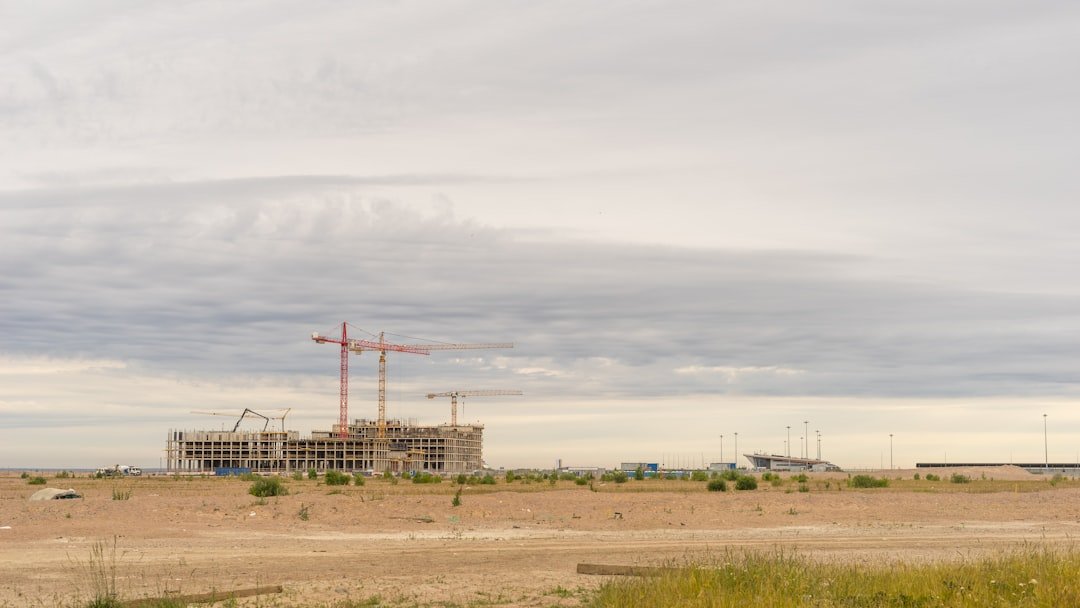
Construction project delivery with cranes illustrating AMAALA Triple Bay project controls and phased handover
Construction delivery requires the schedule, handover sequence and operational interfaces to remain aligned. Illustrative photo by Ant Rozetsky via Unsplash.

Interface management becomes the real critical path

Large destination programmes contain hundreds of interfaces between contractors and operators. The final stage intensifies those dependencies.

For example, a completed guestroom still depends on permanent power, domestic water, fire alarm integration, ICT, access control, housekeeping systems and accepted common areas. A restaurant cannot open simply because the fit-out is finished; kitchen equipment, extraction, gas or power, fire suppression, food-safety requirements, commissioning and operator training all have to be ready.

This is why integrated master schedules are essential. Contractor programmes should not sit in isolation. Key interface milestones need to be connected across packages so the programme can show when one contractor’s delay affects another contractor’s completion or the destination’s opening date.

For teams managing large Primavera schedules, Brainbay’s Project Analyzer provides a practical route to review XER or Excel project data, examine schedule quality, progress and performance indicators, and identify issues that deserve closer engineering review.

From percentage complete to readiness-based reporting

One of the most useful lessons from AMAALA Triple Bay 2026 is that project reporting needs to evolve with the phase of work.

During structural construction, teams naturally focus on concrete, steel, façade, MEP rough-in and major production quantities. Near opening, the dashboard should change. Management needs to see commissioning status, snag closure, outstanding inspections, operator actions, authority approvals, life-safety readiness and package-by-package handover.

The same principle applies to earned progress. Installed work should not automatically be treated as fully earned when the contract or rule of credit requires inspection, testing or acceptance. A reliable reporting structure distinguishes between installed, inspected, commissioned and accepted work.

If your team is still moving P6 data manually into spreadsheets for every reporting cycle, the guide on connecting Primavera P6 and Power BI for better reporting shows a more scalable way to turn programme data into management dashboards.

Sustainability is also a scheduling interface

AMAALA’s environmental commitments are not separate from construction planning. Red Sea Global says the destination is fully powered by renewable energy and is targeting a 30% net conservation gain by 2040.

For delivery teams, that means sustainability requirements can affect utility commissioning, logistics, temporary works, marine activities, waste systems, water management, landscape restoration and handover documentation. Environmental constraints can influence construction sequence just as strongly as physical access or procurement.

The lesson is straightforward: sustainability activities need real logic and ownership in the schedule. They should not be reduced to narrative lines in a monthly report.

Connectivity is part of project readiness

Destination readiness also extends beyond the resort plots. Red Sea Global completed the modernization of AlWajh International Airport in June 2026, restoring scheduled connections and strengthening access to northwest Saudi Arabia.

For planners, this is a useful reminder that an opening milestone may depend on external infrastructure that sits outside the direct construction contract. Roads, airports, utilities, transport systems and public-realm packages can all become programme-level dependencies.

What planning engineers can learn from AMAALA

AMAALA’s transition into operations offers several practical lessons for any large hospitality, mixed-use or infrastructure programme.

  1. Measure the milestone that matters. Operational opening is often more meaningful than a physical progress percentage.
  2. Plan handover early. Testing, commissioning and operator acceptance should be integrated months before the final construction stage.
  3. Control interfaces explicitly. Shared systems and cross-package dependencies need logic, owners and dates.
  4. Change the dashboard as the project matures. Production metrics are not enough near opening.
  5. Protect the audit trail. Progress should be supported by measurable quantities, inspections and approved rules of credit.
  6. Keep the live programme realistic. A schedule that shows completion but ignores unresolved operational constraints is not a useful management tool.

Turn complex project data into clearer decisions

Brainbay brings schedule analysis, progress and EVM review, baseline/update comparison and export workflows into one project-controls platform.

Explore Brainbay Platform Tools   Analyze a Primavera P6 XER file →

AMAALA Triple Bay 2026: the bigger takeaway

The most useful way to describe AMAALA today is not simply “under construction” or “complete.” It is a major destination moving asset by asset from construction into operation.

Four Seasons opened in June. Six Senses followed in July. Rosewood opened on 18 August. Red Sea Global says five more resorts are expected to join the portfolio in the coming months. At the same time, the wider destination continues to develop its hospitality, residences, marina, wellness facilities and visitor experiences.

For project-controls professionals, that transition is the real case study. It shows why the final stage of a megaproject is governed less by headline quantities and more by interfaces, commissioning, approvals and readiness.

AMAALA Triple Bay 2026 is therefore more than a Saudi tourism update. It is a practical example of how complex programmes move from a construction schedule to a functioning destination—and why strong project controls remain critical all the way to opening day.

Sources and references

Categories
Primavera P6

Why a Primavera P6 Schedule Update Shows the Wrong Finish Date

Primavera P6

Why a Primavera P6 Schedule Update Shows the Wrong Finish Date

11 August 2026 — Christian Ramos

Planner checking drawings while diagnosing a Primavera P6 finish-date problem
A disciplined schedule review starts with the underlying plan. Photo by Daniel McCullough via Unsplash.

A Primavera P6 wrong finish date is rarely caused by one dramatic error. In most schedule updates, it comes from several small settings working together: an open-ended activity, an incorrect actual date, the wrong calendar, an overlooked constraint, or a remaining duration that no longer reflects the work on site.

I have seen this happen even in schedules that look clean at first glance. The safest approach is to diagnose the network in a fixed order instead of changing dates until the result looks right.

Start with the data date

The data date is the dividing line between completed work and the remaining plan. If it is earlier or later than the reporting cut-off, all forecast dates can shift.

Before reviewing individual activities, confirm:

  • The data date matches the approved reporting cut-off.
  • Actual starts and finishes are not later than the data date.
  • In-progress work is correctly placed around the data date.
  • The correct project is open when you run the schedule calculation.

A one-day data-date error can affect more than one day of the forecast when calendars, lags, or out-of-sequence progress are involved.

Check actual dates carefully

Actual dates should describe what happened, not what was originally planned. A common mistake is entering an Actual Start on the wrong activity or marking an activity complete while its successor is still logically dependent on it.

Look for these warning signs:

  1. Actual Finish entered before Actual Start.
  2. Actual dates after the data date.
  3. Completed activities with remaining duration or units.
  4. In-progress activities with zero remaining duration.
  5. Successors that started before their predecessors without a valid site explanation.

Oracle explains that early and remaining dates are calculated from relationships, constraints, resource availability, and the status of the activity. Its guide to P6 activity dates is a useful reference when two date fields appear to tell different stories.

Review incomplete logic

Open ends are among the most common reasons a schedule update finishes too early. Every normal activity should have a logical path from project start to project completion, except legitimate start and finish milestones.

Run a schedule check and identify:

  • Activities without predecessors.
  • Activities without successors.
  • Dangling starts or finishes.
  • Excessive lags that hide missing work.
  • Relationships connected to the wrong activity.

Do not solve an open end by connecting it to any nearby activity. The relationship must describe how the work will actually be executed.

Verify calendars and working hours

Two activities with the same five-day duration may finish on different dates if their calendars are different. Check the assigned calendar, workweek, holidays, Ramadan or seasonal working hours, and the hours-per-day settings used to display duration.

Pay special attention when an activity was copied from another project. The copied activity may keep a calendar that is not suitable for the current site.

Investigate hard and soft constraints

Constraints can override or restrict network logic. Mandatory Start and Mandatory Finish are especially powerful and should be used only when there is a clear contractual or physical reason.

For each constrained activity, ask:

  • Is the constraint still valid?
  • Is the date supported by a contract requirement or approved instruction?
  • Is the same requirement already represented by logic?
  • Does the constraint create negative float or hide the real driving path?

If a milestone represents a contractual completion date, a Finish On or Before constraint may be appropriate. For ordinary construction activities, logic is normally clearer and easier to defend.

Check remaining duration and percent complete type

The forecast finish is driven by remaining work. If the remaining duration was not updated after actual progress was entered, P6 may forecast a date that is technically correct but operationally unrealistic.

For an in-progress activity, compare:

FieldPractical question
Remaining DurationHow many working days are genuinely needed to finish?
Physical % CompleteHow much measurable scope is complete?
Duration % CompleteIs progress being calculated from time rather than quantity?
Units % CompleteAre actual and remaining resource units reliable?

Do not force the finish date by reducing remaining duration without evidence. Use quantities, productivity, crew deployment, approved access dates, and current site conditions.

Review scheduling options

Out-of-sequence progress can produce different results depending on whether the schedule uses Retained Logic, Progress Override, or Actual Dates. Retained Logic normally keeps incomplete predecessor work controlling its successors, while Progress Override can allow the remaining successor work to continue.

The correct choice depends on the contract, the approved scheduling procedure, and what actually happened on site. Record the selected option in the monthly schedule narrative so reviewers can reproduce the calculation.

Trace the longest path

If the project finish still looks wrong, start at the completion milestone and trace the driving relationships backward. This is often faster than reviewing thousands of activities.

Check whether the path passes through the work that genuinely controls completion. If it jumps through a minor activity, procurement item, or unrelated area, investigate the logic around that point.

How to fix a Primavera P6 wrong finish date

Use this order every month:

  1. Confirm the data date and schedule options.
  2. Run schedule log checks.
  3. Correct invalid actual dates and status.
  4. Review open ends and dangling logic.
  5. Verify calendars and constraints.
  6. Validate remaining durations using site evidence.
  7. Trace the longest path to the completion milestone.
  8. Compare the current forecast with the previous update.
  9. Record every material change in the narrative.

This method protects the schedule from cosmetic fixes. It also gives management a clear explanation when the finish date changes.

Final takeaway

A Primavera P6 wrong finish date is usually a symptom, not the root cause. The goal is not to make the date match an expectation. The goal is to make the schedule accurately reflect actual progress, remaining scope, access, productivity, and network logic.

If you need help reviewing a complex update, learn more about my project controls experience or contact me for a structured schedule health check.

Frequently asked questions

Why does P6 show a finish date later than my manual calculation?

P6 uses activity calendars, relationships, lags, constraints, the data date, and scheduling options. A manual calendar-day calculation often misses one of these factors.

Can I type a finish date directly to correct the schedule?

You should correct the underlying status, duration, calendar, logic, or approved constraint. Typing a date may hide the real cause and make future updates harder to defend.

What should I check first when the project finish suddenly changes?

Compare the current and previous update for data date, actual dates, remaining durations, logic changes, calendars, constraints, and the longest path.

Planning engineer reviewing a Primavera P6 wrong finish date during a schedule update
Categories
Recovery

Recovery Plan vs Mitigation Plan: What Is the Difference?

Recovery

Recovery Plan vs Mitigation Plan: What Is the Difference?

11 August 2026 — Christian Ramos

Project team comparing recovery and mitigation actions around a planning table
Recovery and mitigation decisions work best when the team reviews the evidence together. Photo by Vitaly Gariev via Unsplash.

The difference between a recovery plan vs mitigation plan is often blurred in construction correspondence. Both respond to schedule risk, but they are not the same document and they should not be requested for the same reason.

Construction team comparing a recovery plan vs mitigation plan during a project meeting

A mitigation plan is mainly intended to reduce the effect of a current or expected delay. A recovery plan is normally required when the project is already behind an accepted programme and must regain lost time to meet a contractual or management target.

That distinction affects the programme logic, resources, cost, approvals, and the language used in the covering letter.

What is a mitigation plan?

A mitigation plan explains how the contractor will limit the impact of a delay event or emerging risk. It can be prepared before the delay fully affects the completion date.

Typical mitigation measures include:

  • Resequencing activities within available access.
  • Moving crews to an alternative workfront.
  • Expediting technical submissions or material delivery.
  • Splitting large activities into smaller zones.
  • Increasing supervision or improving coordination.
  • Working around an obstruction where it is safe and approved.

Mitigation does not automatically mean the contractor accepts responsibility for the delay. A well-written submission should state the cause, reservation of rights, assumptions, and any support required from other parties.

What is a recovery plan?

A recovery plan is a time-bound programme showing how delayed work will be brought back to a required date. It normally includes measurable changes to production, sequence, working time, or resource levels.

A credible recovery plan should contain:

  1. The approved baseline or latest accepted update used for comparison.
  2. The current data date and actual progress.
  3. The amount of delay to be recovered.
  4. Revised logic and sequencing.
  5. Additional crews, shifts, equipment, or workfronts.
  6. Planned productivity and quantity targets.
  7. Required decisions, access, drawings, materials, and interfaces.
  8. Cost and commercial assumptions.
  9. A monitoring method with weekly targets.

A bar chart with shorter durations is not enough. The programme needs a delivery strategy that site teams can actually execute.

Recovery plan vs mitigation plan at a glance

ItemMitigation planRecovery plan
Main purposeReduce or prevent delay impactRegain time already lost
Typical timingBefore or during a developing delayAfter measurable slippage exists
TargetMinimize forecast movementReturn to a defined completion target
Resource impactMay use existing resourcesOften needs additional resources or shifts
Programme detailFocused on affected activities and alternativesDetailed revised programme and production plan
Cost impactMay be limited or event-specificCan involve acceleration and significant cost
MonitoringRisk actions and near-term milestonesWeekly recovery quantities and time gained

A simple construction example

Assume stone installation cannot start in one area because access has not been handed over.

The mitigation plan may move the crew to another approved zone, bring forward cutting-list preparation, and coordinate alternative deliveries. The intention is to keep resources productive and reduce the delay effect.

If access remains unavailable and the project forecast slips by 30 days, the recovery plan may add a second installation crew, introduce extended working hours, divide areas into parallel workfronts, and set weekly square-metre targets. The intention is to recover the 30 days against a stated target.

Who owns the delay?

Submitting a recovery or mitigation plan should not be treated as an automatic admission of liability. Responsibility depends on the contract, event records, instructions, access, approvals, and the actions of all parties.

The covering letter should clearly state:

  • Why the plan is being submitted.
  • Which dates and information were used.
  • Whether the measures are mitigation, recovery, or instructed acceleration.
  • What third-party actions are required.
  • Whether additional cost or time rights are reserved.

AACE International publishes vetted recommended practices on schedule and cost engineering topics. These references can help teams establish consistent terminology, although the contract remains the first document to check.

How to build a realistic recovery programme

1. Status the schedule honestly

Use verified actual dates, installed quantities, remaining durations, and current access conditions. A recovery plan built on optimistic progress will fail quickly.

2. Find the controlling path

Identify the activities that drive the required completion milestone. Adding resources to non-driving work may improve visible progress without recovering the finish date.

3. Test workable scenarios

Compare resequencing, additional crews, overtime, shift work, prefabrication, alternative logistics, and partial handover. Record the assumptions for each scenario.

4. Validate productivity

For every shortened duration, show the quantity, number of crews, working hours, and output per crew. This makes the plan measurable.

5. Confirm prerequisites

Additional labor is useless without approved drawings, materials, access, lifting support, lighting, permits, and inspections. Connect these requirements to the recovery activities.

6. Establish weekly control

Convert the programme into a two-week look-ahead with owners, quantities, and constraints. Review planned versus actual output at least weekly.

Recovery plan vs mitigation plan: common mistakes

  • Calling every revised schedule a recovery programme.
  • Compressing durations without resource calculations.
  • Removing logic to make the finish date earlier.
  • Ignoring procurement, access, or approval constraints.
  • Promising acceleration before cost and responsibility are agreed.
  • Monitoring overall percentage instead of critical quantities.
  • Failing to update the plan when assumptions change.

Final takeaway

In the recovery plan vs mitigation plan discussion, timing and purpose matter most. Mitigation limits the effect of a risk or delay. Recovery regains measurable lost time against a defined date. Both must be based on current site facts, transparent assumptions, and executable actions.

For help preparing a practical programme and narrative, learn more about my planning experience or send an enquiry.

Frequently asked questions

Is a recovery plan the same as an acceleration plan?

Not always. Recovery may use resequencing and better coordination without major acceleration. Acceleration usually involves measures intended to complete earlier than the current achievable date and may have separate contractual consequences.

Can a mitigation plan protect entitlement to an extension of time?

Mitigation can demonstrate reasonable action to reduce delay, but entitlement depends on the contract, notices, causation, records, and the specific event.

How often should a recovery plan be updated?

Track it weekly and revise it when actual productivity, access, resources, or key assumptions materially change.

Categories
Project Controls

Construction Progress Measurement Management Can Trust

Project Controls

Construction Progress Measurement Management Can Trust

11 August 2026 — Christian Ramos

Active construction work used as evidence for reliable progress measurement
Trusted progress starts with observable work, consistent rules and evidence. Photo by chris robert via Unsplash.

Reliable construction progress measurement gives management a factual answer to a simple question: how much of the approved scope is genuinely complete at the reporting cut-off?

Project controls team validating construction progress measurement using site quantities

The calculation becomes difficult when drawings change, work is partially complete, quantities are uncertain, or different teams use different definitions of “done.” A strong system removes that ambiguity before the reporting cycle begins.

Define the purpose of construction progress measurement

Progress may be used for schedule control, client reporting, payment, earned value, productivity, or forecasting. These purposes are related but not identical.

For example, an activity can be physically 80% complete while only 60% is approved for payment because inspections or supporting documents remain outstanding. The report must say which progress definition it uses.

Establish a measurable scope baseline

Start with an approved scope broken down by work breakdown structure, discipline, area, activity, or control account. For quantity-based work, record the budget quantity and unit of measure.

Typical units include:

  • Square metres for flooring, cladding, waterproofing, or painting.
  • Cubic metres for concrete or excavation.
  • Tonnes for structural steel.
  • Linear metres for piping, cable, kerbs, or skirting.
  • Counts for equipment, rooms, panels, or deliverables.

If the scope baseline changes, control the revision. Do not quietly overwrite the denominator, because the reported percentage may move even when no new work was completed.

Use clear rules of credit

Rules of credit divide an activity into objective steps. This is useful when a deliverable or installation cannot be measured fairly with one all-or-nothing status.

For a typical material cycle, the weighting might be:

StepExample credit
Shop drawing approved10%
Material approved and ordered15%
Fabrication complete25%
Delivered to site15%
Installed25%
Inspected and accepted10%

The percentages are only examples. Agree project-specific rules before progress is claimed, and avoid front-loading too much credit to early steps.

Set one cut-off date

All disciplines should report against the same cut-off. Quantities installed after the cut-off belong to the next period, even if the report is prepared several days later.

Record:

  • Reporting period.
  • Data date or cut-off date.
  • Date of site measurement.
  • Schedule version.
  • Quantity-register revision.

This simple control prevents double counting and late adjustments that cannot be verified.

Require supporting evidence

Every claimed quantity should be traceable. Depending on the work, evidence may include:

  • Approved inspection requests.
  • Marked-up drawings.
  • Dated site photographs.
  • Delivery notes.
  • Survey records.
  • Signed daily reports.
  • Test results or commissioning sheets.
  • BIM model status or asset records.

Photographs support the record, but they should not replace measured quantities. Add the date, location, and activity reference.

Separate installed, inspected, and accepted progress

One of the most useful controls is to report these stages separately.

  • Installed: Physical work has been placed.
  • Inspected: The work has been presented for review.
  • Accepted: The inspection or deliverable has been approved.

This shows where production is moving faster than quality closeout and helps management focus on the real bottleneck.

Calculate weighted progress transparently

For a quantity-based activity:

Activity progress = completed quantity ÷ budget quantity

For a weighted programme:

Overall progress = sum of each activity’s weight × activity progress

Weights may be based on cost, labor hours, quantity value, or an approved blended method. The basis must remain consistent.

Avoid averaging percentages without weights. Completing 100% of a small activity should not have the same effect as completing 100% of a major work package.

Reconcile progress with the schedule

Schedule status and progress registers should tell the same story. Review differences such as:

  • Physical progress claimed without an Actual Start.
  • Completed activity with remaining duration or quantity.
  • High percentage complete but no inspection evidence.
  • Installed quantity greater than the approved budget quantity.
  • Progress claimed in an area that has not been handed over.
  • Earned value that does not match the approved weighting.

Oracle’s P6 activity status guidance describes the fields used to review duration, dates, units, costs, float, and completion percentages.

Report variance, not only the percentage

Management needs to know whether progress is ahead or behind and why.

Show:

  • Planned progress.
  • Actual progress.
  • Variance.
  • Period progress.
  • Required rate to meet the next milestone.
  • Main drivers and corrective actions.

A progress curve is useful, but it should be supported by area, discipline, or work-package detail. A single overall percentage can hide serious slippage on the controlling path.

Protect the audit trail

Keep monthly snapshots of source files and approvals. Lock prior-period actuals unless a correction is formally documented. Record who prepared, checked, and approved the data.

A reviewer should be able to reproduce the reported percentage using the saved quantity register, rules of credit, evidence, and schedule version.

Common mistakes

  • Changing weights after progress has started without approval.
  • Counting delivered material as installed work.
  • Using subjective percentages without rules of credit.
  • Mixing cut-off dates between teams.
  • Double counting rework or relocated material.
  • Updating the overall percentage without the underlying quantities.
  • Treating payment certification as identical to physical progress.
  • Reporting precision that the source data cannot support.

Final takeaway

Construction progress measurement becomes trustworthy when scope, quantities, weights, cut-off dates, and evidence are controlled consistently. The system should be simple enough for site teams to maintain and detailed enough for management to verify.

Learn more about my project controls experience or contact me for help setting up progress registers, earned-value reporting, or Power BI dashboards.

Frequently asked questions

What is the best basis for construction progress?

Use measurable quantities where possible. For engineering, procurement, testing, and closeout deliverables, use agreed milestone weights or rules of credit.

How often should progress be measured?

Daily site records support weekly control, while formal progress is commonly consolidated weekly or monthly using one agreed cut-off date.

Can physical progress exceed payment progress?

Yes. Work may be installed but not yet inspected, accepted, documented, or certified for payment. Report the definitions separately.